
Hallo Community!
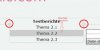
Ich habe ein Problem: In meiner Dropdown-Navigation sind die Links, die bei mouseover runterklappen um etwa 1px nach rechts versetzt, wie unten zu sehen. Ich finde den Fehler einfach nicht!
Quelltext:
HTML:
CSS:
Ich hoffe die Hinweise helfen euch ein bisschen.
Danke für eure Hilfe! ;-)
Martin
Ich habe ein Problem: In meiner Dropdown-Navigation sind die Links, die bei mouseover runterklappen um etwa 1px nach rechts versetzt, wie unten zu sehen. Ich finde den Fehler einfach nicht!
Quelltext:
HTML:
HTML:
<head>
<link rel="stylesheet" type="text/css" href="styletest.css" />
<title>gamecritic.com - Test</title>
</head>

<body>

<a name="anfang"><img src="header.jpeg" alt="gamecritic.com" /></a>

<div id="menu"><!-- öffnet die Navigationsleiste-->
   <ul><!-- öffnet den ersten Themenblock -->
      <li id="links"><!-- öffnet die Listeneinträge von Thema 1 -->
        <h3><b>Startseite</b></h3>
   </ul><!--schließt den ersten Themenblock-->
   <ul><!-- öffnet den zweiten Themenblock -->
      <li id="mitte"><!-- öffnet die Listeneinträge von Thema 2 -->
        <h3>Testberichte</h3>
            <ul><!-- öffnet die Klappnavi von Thema 2 -->
               <li><a href="#">Thema 2.1</a></li>
               <li><a href="#">Thema 2.2</a></li>
               <li><a href="#">Thema 2.3</a></li>
            </ul><!-- schließt die Klappnavi von Thema 2 -->
         </li><!-- schließt die Listeneinträge von Thema 2 -->
   </ul><!--schließt den zweiten Themenblock-->
   <ul><!-- öffnet den dritten Themenblock -->
      <li id="rechts"><!-- öffnet die Listeneinträge von Thema 3 -->
          <h3>Community</h3>
            <ul><!-- öffnet die Klappnavi von Thema 3 -->
               <li><a href="#">Thema 3.1</a></li>
               <li><a href="#">Thema 3.2</a></li>
               <li><a href="#">Thema 3.3</a></li>
            </ul><!-- schließt die Klappnavi von Thema 3 -->
         </li><!-- schließt die Listeneinträge von Thema 3 -->
   </ul><!--schließt den dritten Themenblock-->
</div><!-- schließt die Menüleiste #menu -->


<div style="clear: both;"> </div>

<div id="Inhalt">
<div id="login">
<form action = "login.php" method = "post">
<input name="username" >  Benutzername</input>
<input type="password" name="passwort">  Passwort</input>
<input type = "submit">
</form>
</div>
<br>
<h2>Test</h2>

<p>
Duis autem vel eum iriure dolor in hendrerit in vulputate velit esse molestie consequat, vel illum dolore eu feugiat nulla facilisis.
At vero eos et accusam et justo duo dolores et ea rebum. Stet clita kasd gubergren, no sea takimata sanctus est Lorem ipsum dolor sit amet. Lorem ipsum dolor sit amet, consetetur sadipscing elitr, sed diam nonumy eirmod tempor invidunt ut labore et dolore magna aliquyam erat, sed diam voluptua. At vero eos et accusam et justo duo dolores et ea rebum. Stet clita kasd gubergren, no sea takimata sanctus est Lorem ipsum dolor sit amet. Lorem ipsum dolor sit amet, consetetur sadipscing elitr, At accusam aliquyam diam diam dolore dolores duo eirmod eos erat, et nonumy sed tempor et et invidunt justo labore Stet clita ea et gubergren, kasd magna no rebum. sanctus sea sed takimata ut vero voluptua. est Lorem ipsum dolor sit amet. Lorem ipsum dolor sit amet, consetetur sadipscing elitr, sed diam nonumy eirmod tempor invidunt ut labore et dolore magna aliquyam erat.
</p>
</div>
<div id="AGB">
<a href="agb.htm">AGB</a> <a href="impress.htm">Impressum</a><a href="#anfang">Seitenanfang</a>
</div>

</body>

</html>
Code:
* {
margin: 0;
padding: 0;
}

html
{
background-image: url("background.jpeg");
}

body
{
margin: 0 auto 60 auto;
width: 903px;
font-family: Verdana, Arial, sans-serif;
border-right:    1px solid #CCCCCC;
border-left:    1px solid #CCCCCC;
border-bottom:1px solid #CCCCCC;
}

p
{
margin-bottom: 8px;
}


h1
{
font: normal 2em Georgia;
padding: 15px 0;
text-align: center;
}

h2
{
font: normal 1.3em Georgia;
padding: 10px 10px 30px;
}

#menu {
width: 100%;
font-family: Verdana;
font-size: 1em;
line-height: 1.5;
float: left;
}

#menu ul {
float: left;
width: 140px;
list-style-type: none;
width:    300px;
}

/*--definiert die Blocküberschriften--*/
#menu h3 {
font-size: 1em;
text-align: center;
color: #000;
background-color: f0f4f3;
width:    301px;
}

/*--definiert die "Drop-Down-Links" im Normalzustand--*/

#menu a {
text-decoration: none;
display: block;
border-left: 1px solid #ccc;
border-right: 1px solid #ccc;
border-bottom: 1px solid #ccc;
text-align: center;
color: #003366;
font-size: 1em;
color: #000;
background-color: f0f4f3;
width:    299px;
}

/*--definiert die "Drop-Down-Links" im Hoverzustand--*/
#menu a:hover {
background-color:    #CCCCCC;
}

#menu li {
position: relative;
}

/*--versteckt die "Drop-Down-Links", solange nicht gehovert wird--*/
#menu ul ul {
position: absolute;
display: none;
}

/*--lässt die Dropdown-Links beim Hovern erscheinen--*/
#menu ul li:hover ul {
display: block;
}

#links
{
border-top:        1px solid #CCCCCC;
border-bottom:    1px solid #CCCCCC;
}

#mitte
{
border-bottom:    1px solid #CCCCCC;
border-top:        1px solid #CCCCCC;
border-left:    1px solid #CCCCCC;
}

#rechts
{
border-top:        1px solid #CCCCCC;
border-bottom:    1px solid #CCCCCC;
border-left:    1px solid #CCCCCC;
}


#login
{
float:    right;
width:    270px;
border:    1px solid black;
font-size:    12px;
color:    #f4719d;
}


#Inhalt
{
clear: both;
padding: 20px;
min-height: 300px;
}


#AGB
{
color:    #f4719d;
}

#AGB a
{
color:    #f4719d;
text-decoration:    none;
float:    right;
margin-right:    30px;
margin-top:    15px;
font-size:    14px;
}

#AGB a:hover
{
font-weight: bold;
}´


/*--nur für IE-Versionen kleiner gleich 6 erkennbar--*/

* html #menu ul li {
float: left;
width: 100%;
}

/*--nur für IE 7 erkennbar--*/

*+ html #menu ul li {
float: left;
width: 100%;
}
/*--bewirkt Hover-Effekt für IE kleiner 7 auch für ul- und li-Elemente--*/
*html body {
behavior: url(csshover3-source.htc);
font-size: 100%;
}

*html #menu ul li a {
height: 1%;
}
Ich hoffe die Hinweise helfen euch ein bisschen.
Danke für eure Hilfe! ;-)
Martin
